
How to Play Solitaire

Klondike Solitaire — the classic card game, free online
Solitaire (also called “Patience”) is the card game many of us grew up playing with a real deck at the kitchen table. This free website plays it exactly the same way, but the computer shuffles and deals for you — and you can never lose a card under the couch.
What You’ll Need
- A computer, laptop, or tablet with an internet connection
- A mouse, trackpad, or touchscreen — no download, no account, and no cost
- About 10–15 minutes for your first game
The Game Board
When the page opens, you’ll see the board already dealt. It has three parts, shown below:

Getting Started
- Go to solitr.com in your web browser. The game deals itself automatically — no “start” button needed.
- Look at the seven columns at the bottom (the Tableau). Only the bottom card in each column is face-up — that’s the only one you can play right away.
- Click the face-down Stock pile (top left) any time you want to turn over a new card to play.
- Your goal is to move cards around until you can build all four Foundations from Ace up to King.
Moving a Card
This is the one rule that matters most in Solitaire: in the columns, you can only stack a card onto one that is exactly one number higher, and the opposite color.
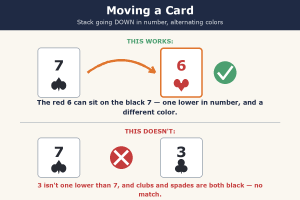
To move a card, click and hold it, drag it onto the card you want to stack it on, and let go. If the move isn’t allowed, the card will simply slide back — you can’t make a mistake that hurts your game, so feel free to experiment.
Filling the Foundations
The four boxes in the top right are the Foundations — one for each suit. You win by moving every card there, in order, starting with the Ace.

- As soon as an Ace becomes available, click and drag it up to an empty Foundation slot.
- Keep building that suit upward — 2, 3, 4, and so on — whenever the next card becomes available.
- When all four Foundations are complete (Ace through King), you’ve won the game!
Tips for Success
- There’s no clock and no penalty for taking your time — think through each move calmly.
- Click “Undo” (top right) any time you want to take a move back.
- Click “New Game” whenever you’d like to start over with a fresh deal.
- An empty column can hold a King (and only a King) — this is a handy trick to remember.
If Something Goes Wrong
- Stuck with no moves? Keep clicking the Stock pile to cycle through more cards — there are often more options than they first appear.
- Card won’t move where you want? It probably breaks the “one lower, opposite color” rule — check the picture above.
- Page looks strange or frozen? Simply reload the page and click “New Game.”
Every game of Solitaire is a little different, and that’s exactly why it’s such good, relaxing practice for planning ahead and spotting patterns. Enjoy!
Responses